Is StripChat Safe? Privacy and Account Security
Before creating an account or buying tokens, it helps to understand what privacy means on StripChat. A username, private browser window and discreet billing each address a different concern. This guide explains how to protect your login, limit what you share and check payment details without assuming that any online service is completely anonymous or risk-free.
Is StripChat safe and legit?
StripChat operates a live-streaming website with a published privacy policy and an official support center. Those resources let you check how the service describes its data practices and account features. They do not guarantee that every link, message or offer using the StripChat name comes from the platform.
Start at the official website rather than a link sent by a stranger. Check the address before entering your password, and review the price and any recurring-payment terms before confirming a purchase. If a message claims that you need to pay someone directly to unlock or repair your account, verify the request through support first.
Is StripChat anonymous?
A nickname can separate your public identity from your everyday name, but it does not make you anonymous to the service. StripChat's privacy policy describes collecting technical information such as IP addresses and usage data, as well as account and transaction information for members. It also warns that profile information can be public unless stated otherwise.
Choose a username that you do not use for work or personal social accounts. Avoid posting your full name, contact details, location or identifying photographs in your profile or chat messages. Before sharing anything, consider whether you would be comfortable with another person saving or forwarding it.
For the current rules about a particular field or feature, read the explanation shown in your account and the platform's policy. Do not assume that a privacy-related feature hides all activity or removes information already shared.
How to protect your StripChat account
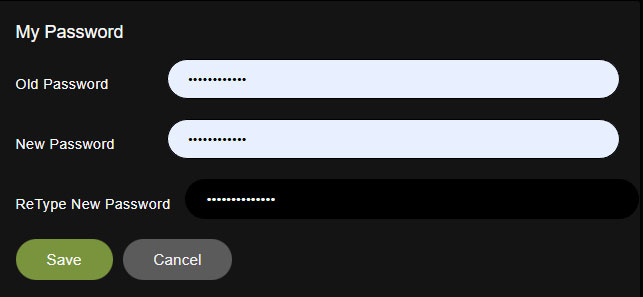
Use a long, unique password and keep it in a trusted password manager. Reusing an email or social-media password makes an unrelated account breach more dangerous. Protect the email account linked to StripChat as well, because it is part of the password recovery process.
StripChat's two-factor authentication instructions describe enabling 2FA from Settings and Privacy. Follow the current setup prompts to connect an authenticator app and confirm the code. Keep the setup key and authentication codes private; never send them to someone offering account assistance.
If you forget your password, use the recovery option in the login window. Our password recovery guide explains the process. A password reset should be started from the real site, rather than an unexpected message asking you to sign in elsewhere.
Private browsing and shared devices
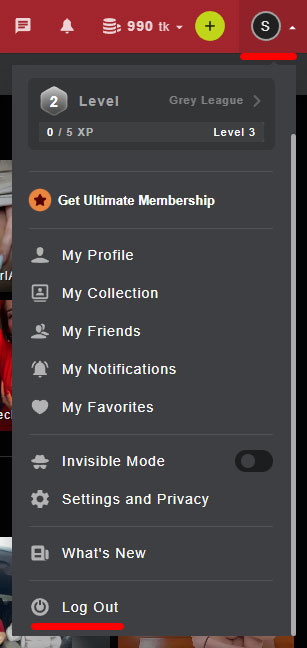
On a shared device, log out when you finish and avoid saving your password in another person's browser. The StripChat logout guide shows the account-menu option. Check that your session has ended before handing the device to someone else.
Private browsing can reduce the history and site data left in that browser after the private session ends. However, Google's explanation of Incognito mode makes clear that it does not hide your activity from websites or organizations managing your network. Downloaded files and saved bookmarks can remain on the device.
Close all private windows when you finish. Also consider information outside the browser: email receipts, screenshots and banking notifications are separate records. Private browsing does not remove them or cancel a subscription.
What does StripChat show on a bank statement?
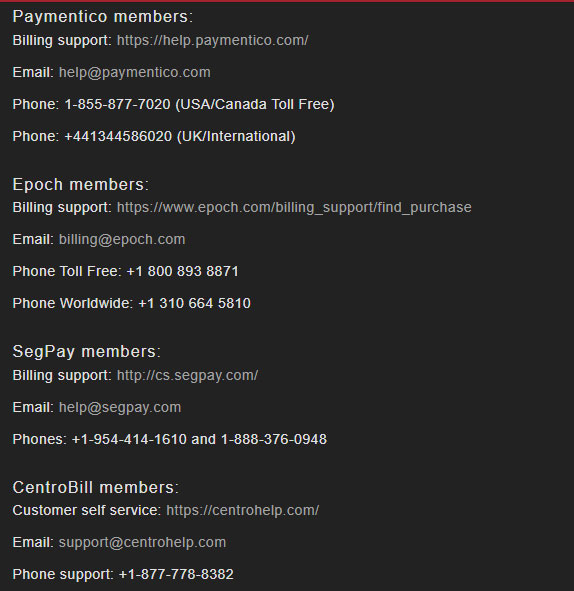
The name depends on the payment provider. The official bank-statement guide lists examples including EPOCH.COM*Technius, SegpayEU.com-TechChat, Paymentico.com, centrobill.com and Technius Ltd. Check the current checkout information and your receipt for the provider handling your purchase.
A provider name does not make a payment invisible: the transaction can still appear in your banking app, statement or account notifications. If you do not recognize a charge, compare its amount and date with your receipts and ask official billing support to help identify it. Our token purchase guide and subscription cancellation guide cover the related account steps.
Free tokens, generators and suspicious links
Treat a third-party “StripChat token generator,” hack or modified APK as a security warning. Do not enter your password, install an unknown file or pay an activation fee because a page promises to add free tokens. A page that copies the site's logo is not proof that it is connected to StripChat.
The platform's giveaway help article describes an on-site promotion with participation conditions. Check the terms displayed on the platform rather than assuming that registration guarantees a prize. For what you can access without buying tokens, see our free access guide.
What to do if something seems wrong
If you entered your password on a suspicious page, change it from the official site using a trusted device. Change it on any other account where you reused it, secure your email, and contact official support if you notice unfamiliar account activity.
For an unfamiliar payment, save the receipt, date, amount and billing name. Contact the provider through the platform's current billing information; do not send full card details, passwords or authenticator codes in a chat message. If a message or user is the concern, keep evidence and use the platform's reporting or support options. Our support guide explains where to find help.
Safety and privacy FAQ
Can other people identify me from my username?
They may be able to connect it to you if you use the same name elsewhere or share identifying details. A separate nickname helps limit that connection, but it is not a guarantee of anonymity.
Does Incognito hide a StripChat payment?
No. It concerns information saved by the browser. It does not hide bank transactions or erase email receipts.
Can someone from support ask for my login code?
Keep passwords and one-time authentication codes private. If someone asks you to send them, stop and open the official support center yourself to verify the request.
What if I cannot log in after securing my account?
Use the official recovery process and record any error message. Our login troubleshooting section covers the next checks.
Information checked on October 11, 2026. Screenshots show an earlier interface; follow the current account and checkout prompts for available settings and billing details.